

Guide
The QuantBloc guide
Every page of the site, in plain words: what it is for, how to use it, what not to misread.
Getting started
QuantBloc records every trade of tokens born on pump.fun, on pump.fun and on PumpSwap, since May 13, 2026. Over 30 million wallets, with no filter at the start: robots and token creators included.
Two questions, always kept apart
What the wallet did: its buys, its sells, its gain. This is the “Their trade” part, visible to everyone.
What you would have got by copying it: at best your entry lands in its block, often 1 or 2 blocks later, at a worse price. This is the “Your backtest” part, for Premium only. The gap between the two tells you whether a wallet can be copied or not.
The Base
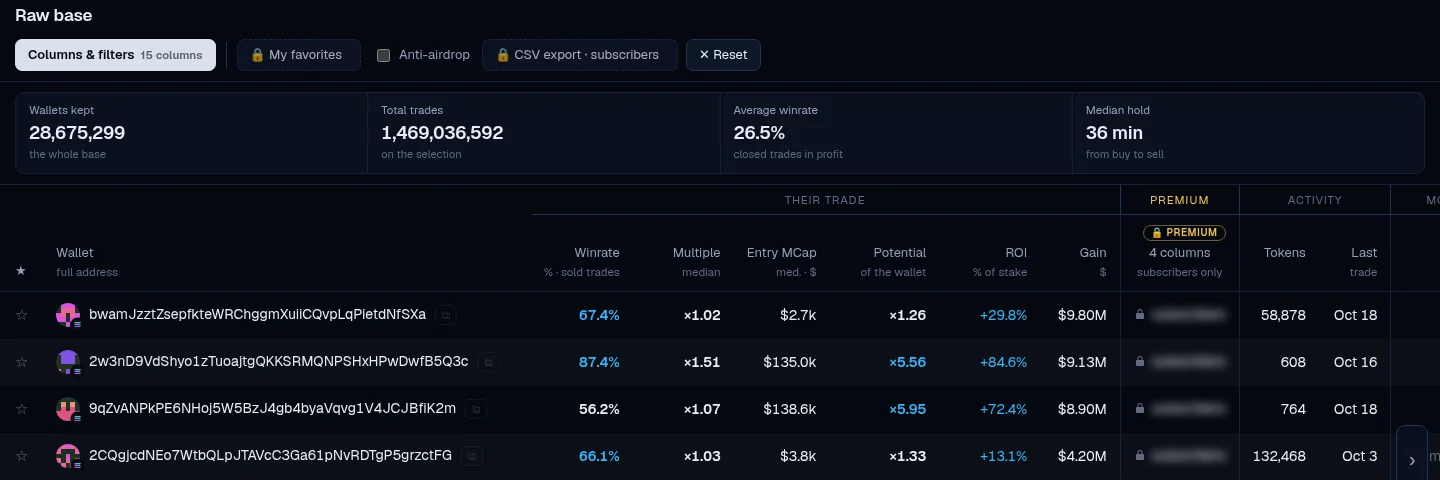
One row per wallet, its whole history. This is where you look for wallets to follow, with your own columns, filters and sort order.
In 3 moves
- Columns & filters: choose the columns to show, then set a minimum or a maximum on each one. Active filters appear as chips; a cross removes them.
- Sort by clicking a column title: one click sorts from largest to smallest, a second click reverses it.
- Click a row to open the wallet page (Ctrl + click for a new tab).
Handy shortcuts
My views: save a set of columns and filters under a name, to bring it back in one click on this device.
Wallets that really buy: staked at least 1 SOL, at least 20 trades, under 50% of tokens received.
Anti-airdrop: rules out wallets where more than half of the trades are tokens received without a buy.
The star adds a wallet to your favorites; “My favorites” then shows only yours.
Columns to know
- Winrate
- Share of its sold trades where it exits higher than it entered. Always read it with Resold: a winrate on 1 sale is not a habit.
- Median multiple
- Exit price divided by entry price, median over its resold tokens.
- Potential of the wallet
- The highest point the token reached after its buy, divided by its entry. It is what the token did, not what it cashed in.
- Rugs
- Share of its buys over the last 60 days made just before a rug. Empty cell = too few buys to judge, not “clean”.
- Entry delay
- Time between the token's creation and its buy. Short = it gets in early.
- Received
- Share of its trades where it sold more tokens than it bought (airdrops, transfers). Above 50%, its gain cannot be reproduced.
- Gain and Copyable gain
- Cashed in minus spent, pump.fun and PumpSwap fees deducted, without what it still holds. Copyable gain removes airdrops: a large gap = a wallet fed on airdrops.
- Balance
- Recorded only for wallets active over 7 days. “Not recorded” means never measured, not zero. The wallet page gives the live balance.
The wallet page
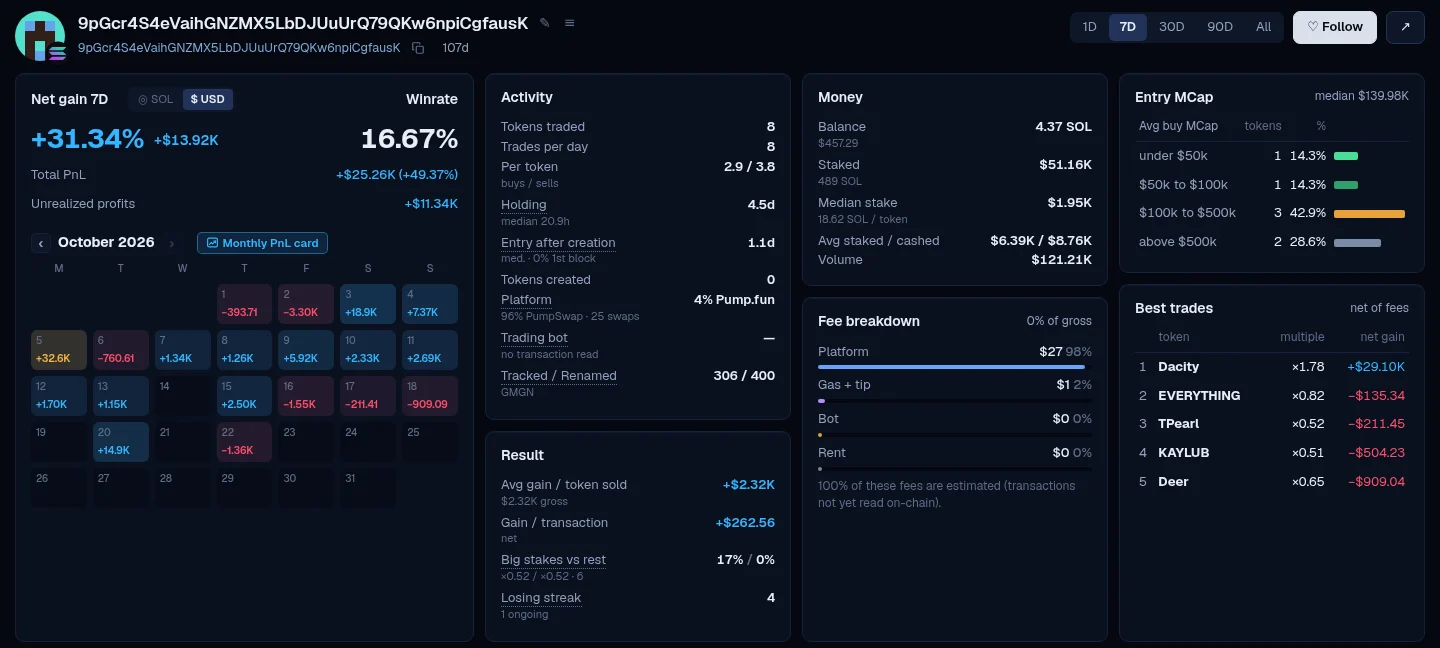
Everything a wallet did, trade by trade, over the period of your choice.
In 3 moves
- Choose the period at the top right: 1D, 7D, 30D, 90D or All. Every block follows.
- Read the blocks: net gain and calendar, activity, money, fees, entry MCap, best trades.
- Scroll down to the token table, one per row. Click a token for its details.
What the blocks say
- Net gain
- What it made on what it sold, its fees included, as on GMGN. Its tokens still held are in “Unrealized profits”.
- Calendar
- Net gain day by day. Clicking a day gives its PnL card to share; the month button gives the month's card.
- Activity
- Tokens traded, pace, entry delay after creation, recognized trading bot (Axiom, Padre, GMGN, Photon…), platform.
- Fees
- Platform, gas and tip, bot, rent. “Estimated” when the transaction has not been read on chain yet.
- Table tabs
- Bought and measurable: a copy trader's entry and exit are both known. Not measurable: one of the two is missing. Airdrops: sold with no buy ever seen.
The buttons
Follow adds the wallet to your favorites (the same list as the star in the Base). ✎ gives it a name. Backtest this wallet opens the Backtest already set up for it (Premium).
Mooners 24h
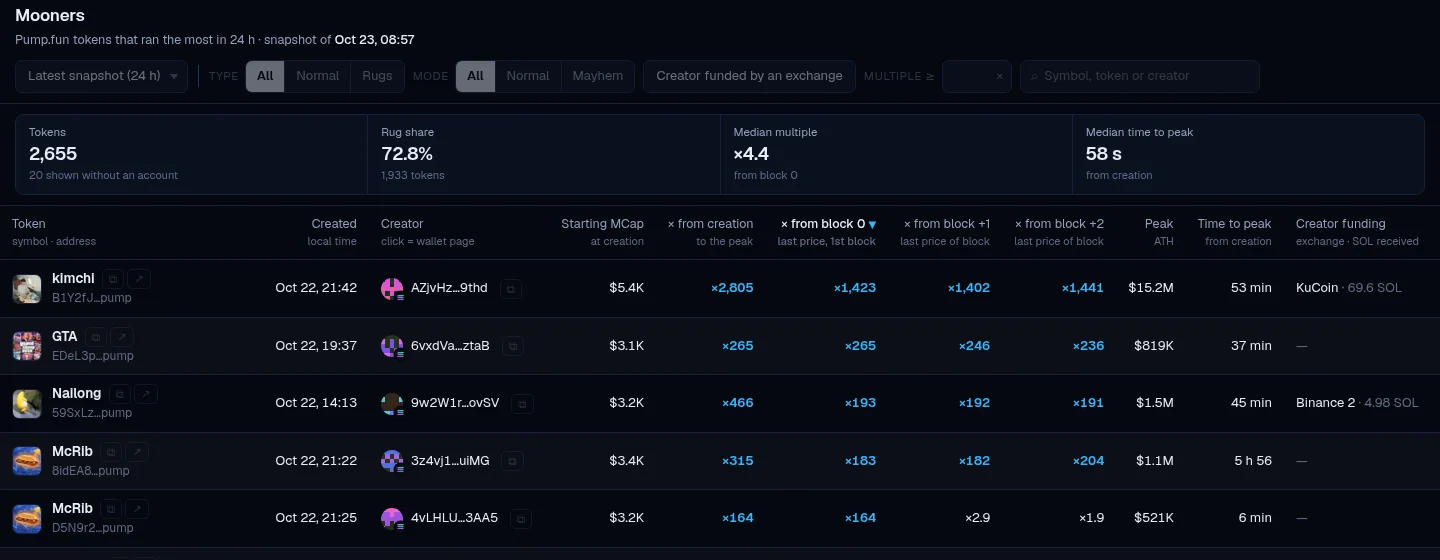
The pump.fun tokens that rose the most in 24 hours, and who got in early. Recorded every morning at 7 a.m. (Paris time), kept for 30 days.
How to read it
- × since block 0, +1, +2
- How many times the token was multiplied since the end of its first block, its second, its third. Block +2 is what a copy bot really gets.
- Creator funding
- The exchange that sent the creator its first SOL, and how much. “—” = funded by a wallet that is not an exchange; “unknown” = not found yet.
- Mayhem
- A pump.fun mode where the token address does not end in “pump”.
Click the creator to open its wallet page. Filters: type (normal or rug), mode (normal or mayhem), creator funded by an exchange, minimum multiple.
The Backtest STARTER
Replay the copy of a wallet over a period: what you would have made or lost by following it, fees included.
Two ways to test
FULL COPY (buy + sell): you copy its buys and you sell when it sells, under your own rules.
TP CONFIGURATION: you copy its buys; we test 175 settings (25 exits: 24 profit targets from +20% to +1,000% plus “no TP”, crossed with 7 stops) and tell you which ones would have worked best.
In 3 moves
- From a wallet page, Backtest this wallet; or + New backtest on the Backtest page. Start from a preset, for example “Realistic copy bot (block +2)”.
- Set the 4 cards: Entry (block, delay, MCap, filters), Stake (fixed amount or % of its stake), Exit (take-profit, stop-loss, when it sells), Fees.
- Run. You are notified in your messages when it is done (and on Telegram if you ticked it). Every backtest stays saved on your account.
The result
Net result, return, winning trades, worst drawdown, what fees cost you from gross to net, and the Them vs you table: its median trade next to yours.
Tokens
A backtest is paid in tokens, based on the number of trades replayed. Its cost is shown before you launch it. Past your limit, it uses your topped-up tokens.
The Top traders PREMIUM
The best users of 22 trading bots (Axiom, Fomo, GMGN, Padre, Trojan, Photon…), and what they are buying right now. This is market watch, not a copy signal.
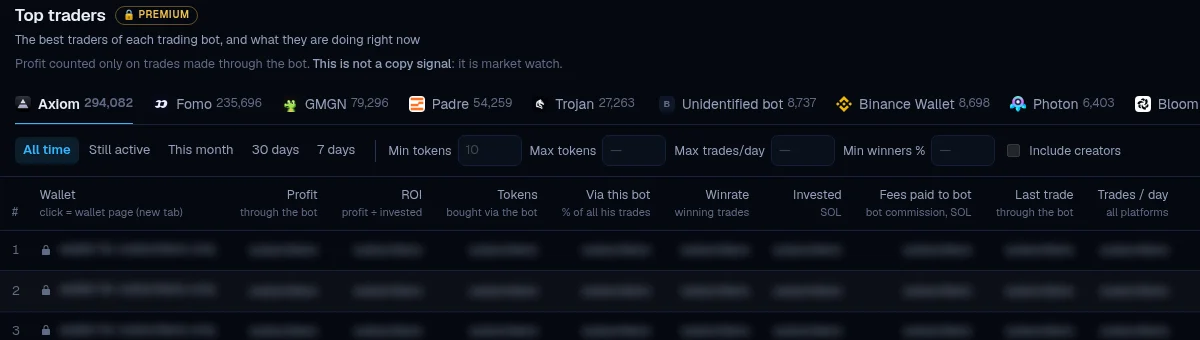
The gain only counts trades placed through this bot. Filter by period, number of tokens, trades per day (to rule out robots) and share of winners. The labels flag what cannot be copied: Robot, Creator, Same operator, Gain on a single token, Sniper.
The AI connector PREMIUM
Plug your own Claude or ChatGPT into the QuantBloc base and ask your questions in your own language: it fetches the numbers here.
In 3 moves
- Copy the address https://quantbloc.com/mcp, the same for everyone.
- Add it to your tool: claude.ai (Settings, Connectors), Claude Code, or ChatGPT via Codex. The Connector page details each tool.
- A QuantBloc window opens: click Telegram, that is all. Access stops on its own if the subscription stops.
14 tools, read-only: search wallets, detail a wallet, list its trades, list its positions, see which trading bots it goes through, run a FULL COPY backtest, find the best TP/SL, list the fields, for a token: its summary, its trades, its top traders and early buyers, for launches: every token created in a period or by a creator, and read your QuantBloc messages. You can give up to 50 wallets, 20 tokens (summary) or 10 tokens (top traders) at once. Limit: 60 requests per minute (a grouped request for N counts as N), 2 requests at a time, 10,000 rows per day.
Your account
One click with Discord, Google or Telegram, no password. They only confirm that it is you: we never see your messages or your password.
- My account
- Your plan and its end date, your limits for the day (reset at midnight, Paris time), your sign-ins, your payment history.
- Starter
- $29 for one month, paid in SOL, USDC, ETH or USDG. No automatic renewal: a reminder 3 days before it ends.
- Premium
- $99 for one month, from $60 a month over 12 months. Paid in SOL, USDC, ETH or USDG, active in 30 seconds. No automatic renewal: a reminder 3 days before it ends, then back to visitor limits, unless you have Starter.
- Top-ups
- Extra backtest tokens, from My account, from $5. They never expire and are only used once your limit is reached. $2.40 per 1,000 tokens with Starter (up to $30 of top-ups a month), $1.20 with Premium.
- Messages
- Payments, end of subscription, finished backtests, announcements. The envelope at the top of the page.
- Discord
- Link your account once: Member role for everyone, QuantBloc Pro role and Pro channels for Premium members.
- Settings ⚙
- Amounts in $ or in SOL, copy trader's entry block (0, +1 or +2), theme, language. Saved on your account.
Frequently asked questions
Short answers to the most common questions.
How do I find Solana wallets to copy trade?
In the QuantBloc Base, filter on few rugs, recent activity and no token created, then sort by “Multiple if copied” (Premium): this column ranks wallets on what a copier would have made, not on the wallet's own gains. Then run a backtest on a candidate before putting money in. The First steps open the Base with these filters already set.
Where can I find Solana wallet lists to import into GMGN or Axiom?
QuantBloc Tracker lists give five lists recalculated every Monday: profitable wallets, gem hunters, whales, KOLs and dev wallets. Tick the wallets you want (or take the whole list), copy, then paste into GMGN (Track, Import, Paste) or into Axiom's wallet tracker import. The figures shown are the wallet's own: run its backtest before copying it. The lists are for Starter and Premium subscribers.
How can I check whether a Solana wallet was profitable to copy?
Run its FULL COPY backtest: QuantBloc replays copying its trades over the chosen period and gives the result with all fees included. You choose the entry block (the same as the wallet, 1 or 2 blocks later), the stake and the exit. From a wallet page, click “Backtest this wallet”. Your first backtest is free when you log in.
Why can I lose money copying a profitable wallet?
Because the copier does not buy or sell at the same price as the wallet. A copy bot must see the wallet's buy before sending its own: it cannot enter before it, and often enters 1 or 2 blocks later, at a sometimes different price. It also pays its own fees on the buy and the sell, and its own buy pushes the price up. In the backtest, the default entry is the same block as the wallet; the “Realistic copy bot (block +2)” preset enters 2 blocks later. See a real example: a wallet at +722 SOL whose copier loses.
Can I paper trade a Solana wallet before copying it?
No, not live: QuantBloc replays the past and sends no orders. The backtest computes what someone copying the wallet would have made, at the block you choose, following its sells, with fees and the effect of your own buy on the price. Your first backtest is free when you log in.
Why do dev wallets look so profitable?
Because on its own tokens, the dev buys first. The dev is the wallet that creates the token: a copier always arrives after it, and its gains on those tokens do not show what a copier would have made. The “Created” (tokens) column of the Base flags them; the backtest tells you what a copier would have got.
How can I check whether a wallet buys tokens that later rug?
Look at the “Rugs” column of the Base: it is the share of its buys over the last 60 days made before a rug of the token. A rug, for QuantBloc: the price loses at least 50% over the next two trades, then never comes back above half of its previous level. Read it with the “judged buys” column: 20% on 5 buys is not 20% on 500, and the rate becomes reliable from 15. An empty cell means no buy could be judged, not “clean”.
Which pump.fun tokens went up the most yesterday?
QuantBloc's Token list (Mooners) gives every morning the tokens born on pump.fun, mayhem included, that went up the most over the last 24 hours. For each one: its market cap peak, the time from launch to that peak, what is left of it, the creator's wallet and who funded that creator first (for example an exchange), with the amount of that first transfer. It describes what happened: it is not a list of tokens to buy.
Which Solana wallets make the most with Axiom, GMGN or Photon?
QuantBloc's Top traders rank, for each trading bot (Axiom, GMGN, Padre, Photon…), the wallets with the best results on the trades made with that bot, net of fees. A wallet's gain "via a bot" is the result of its positions multiplied by the share of SOL it spent with that bot. It is a list of wallets to watch, not a copy signal: run a wallet's backtest before copying it. Rankings, gains and latest buys are part of Premium.
How can I query Solana wallet data with Claude or ChatGPT?
Connect QuantBloc's AI connector (MCP) to your assistant: Claude, ChatGPT (via Codex) or any MCP-compatible tool. The address is the same for everyone: https://quantbloc.com/mcp. You then ask your questions in plain language and the assistant fetches the numbers from the database: search wallets, list their trades, see which trading bots they use, a copier's positions at block 0, +1 and +2, run a backtest. The tools are read-only. The connector is part of Premium.
What state is the pump.fun memecoin market in today?
Open QuantBloc's Market weather (the badge at the top of every page), visible to everyone. The weather shown follows the number of tokens created on pump.fun, compared with the same period over the previous 60 days: full sun when more are created than on almost every day, storm when fewer are. It reads over the last hour, 6 hours, 24 hours or 7 days. It also gives the day's readings: volume, tokens migrated to PumpSwap, active traders, new wallets, brutal rugs, and how many tokens did ×2 to ×100 after their creation.
Profitability, capital and the limits of a backtest
The questions to ask before putting money in. None of these answers promises a gain.
Is memecoin trading profitable?
For some wallets, yes; for the person copying them, not necessarily. What a wallet makes is not what its follower makes: the follower enters after it, pays its own fees and moves the price with its own buy. Only a backtest with your settings tells you what a copy would have given. See a real example: a wallet at +722 SOL whose copier loses.
How much capital do I need to start?
There is no universal minimum, and QuantBloc does not give one. What matters is the stake per trade against the fees: the fixed fees of each transaction (priority, Jito) weigh more on a small stake. In the backtest, set the stake in dollars, for example $30 per trade, to see what your own size gives. In the Base, the “Gain / trade” column flags wallets whose margin is too thin to cover a copier's fees.
What winrate should I aim for?
No winrate is enough on its own. Many small gains can hide a big loss, and a winrate on 1 or 2 sells is only luck. Look at the net result and the gain per trade, with the “Resold” column next to it. The “Best share” column tells you whether the gains come from a method or from a single lucky hit.
How can I tell whether a strategy has a real edge, without overfitting?
By judging it on trades it has not seen. The TP CONFIGURATION backtest tests take-profit and stop-loss settings on the same trades, then makes its choice again several times with only the past known and checks it each time on the trades that followed: this is the walk-forward test. Look at that figure first. The choice of the wallet itself is not tested.
Does a good backtest guarantee gains?
No. A backtest replays the past and sells at the observed price; in reality, a sell during a crash often goes through lower. It is a ceiling, not a promise. It helps rule out wallets that would not have paid, not predict what comes next.
Pitfalls to know
- Potential is not a gain.It is what the token did after the buy, not what the wallet cashed in. What a copy trader really gets is in “Your backtest”.
- A high winrate means nothing on its own.Many small gains can hide one big loss, and a winrate on 1 or 2 sales is just luck. Always look at “Resold”.
- A token creator cannot be copied.Its numbers are excellent because it launches its own tokens. The “Tokens created” column tells you.
- A backtest is a ceiling.It sells at the observed price; in real life, you often sell lower during a crash.
Glossary
- Block 0, +1, +2
- The block where the wallet buys, then the next one, then the one after. A copy bot usually arrives 1 or 2 blocks later.
- MCap
- The token's market cap at the time of the trade.
- Multiple
- Exit price divided by entry price. ×2 = the stake doubled.
- Rug
- A drop of at least 50% in an instant, never recovered.
- Micro-buy
- A buy of fewer than 100 tokens: counted in trades, never in amounts.
- Airdrop
- A token received without a buy, then sold.
- FULL COPY
- Backtest where you copy its buys and its sells.
- TP / SL
- Take-profit (sell at +X%) and stop-loss (sell at −Y%).